Searching Google From Anywhere!
Today I’d like to discuss how you can get around Google’s restrictions on localised searching; specifically, viewing localised SERPs. I put together a little web application in preparation for Dave’s session at SEOktoberfest and everyone seemed to like it. I’ll share that with you in just a little bit but before that, I’ll go into some of the internal of how I’ve done it.
Here’s a little preview, click this link and you’ll be searching for Plumbers from Manchester, here’s a screenshot (using sarcastically obnoxious arrows to illistrate my point):
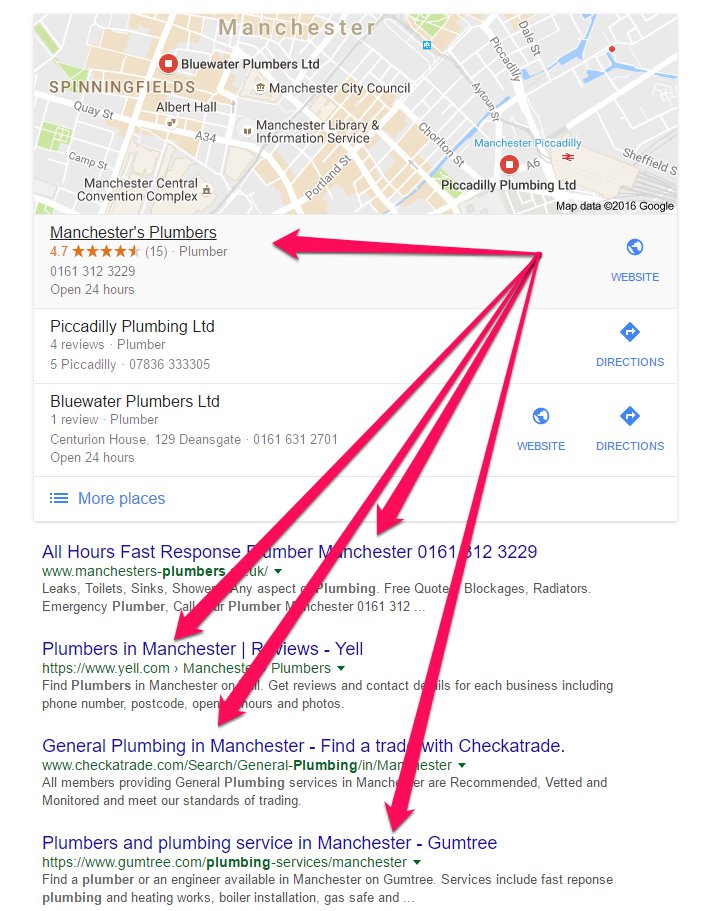
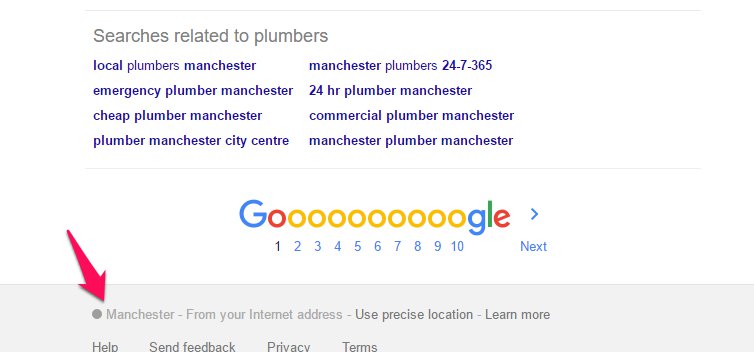
Here’s the same results in Leeds, London and New York.
So how is this done?
First we need to create a key, these are “secret keys” based on the length of the location name – this is used as a delimiter between the Google standard protocol “CAIQICI” and the encoded base64 string, within the URL.
(code in Python)
keys = {
    4:"E", 5:"F", 6:"G", 7:"H", 8:"I", 9:"J",
    10:"K", 11:"L", 12:"M", 13:"N", 14:"O", 15:"P",
    16:"Q", 17:"R", 18:"S", 19:"T", 20:"U", 21:"V",
    22:"W", 23:"X", 24:"Y", 25:"Z", 26:"a", 27:"b",
    28:"c", 29:"d", 30:"e", 31:"f", 32:"g", 33:"h",
    34:"i", 35:"j", 36:"k", 37:"l", 38:"m", 39:"n",
    40:"o", 41:"p", 42:"q", 43:"r", 44:"s",45:"t",
    46:"u", 47:"v", 48:"w", 49:"x", 50:"y", 51:"z",
    52:0, 53:1, 54:2, 55:3, 56:4, 57:5, 58:6, 59:7,
    60:8, 61:9, 62:"-", 63:"", 64:"A", 65:"B", 66:"C",
    67:"D", 68:"E", 69:"F", 70:"G", 71:"H", 72:"I",
    73:"J", 76:"M", 83:"T", 89:"L"
    }
To explain, the URL structure is broken down as follows:
Complete URL: https://www.google.co.uk/search?q=plumbers&uule=w+CAIQICIFbGVlZHM
Standard search URL: https://www.google.co.uk/search?q=plumbers
Location specific parameter: &uule=w+CAIQICIFbGVlZHM
Standard protocol: &uule=w+CAIQICI
Secret key: F
Base64 (which we’ll get to in a minute): bGVlZHM
So the base64 encoding is the place name, encoded in base64, for example Leeds, which would become bGVlZHM.
Finally, we can tie this all together, with the following:
keys = {
    4:"E", 5:"F", 6:"G", 7:"H", 8:"I", 9:"J",
    10:"K", 11:"L", 12:"M", 13:"N", 14:"O", 15:"P",
    16:"Q", 17:"R", 18:"S", 19:"T", 20:"U", 21:"V",
    22:"W", 23:"X", 24:"Y", 25:"Z", 26:"a", 27:"b",
    28:"c", 29:"d", 30:"e", 31:"f", 32:"g", 33:"h",
    34:"i", 35:"j", 36:"k", 37:"l", 38:"m", 39:"n",
    40:"o", 41:"p", 42:"q", 43:"r", 44:"s",45:"t",
    46:"u", 47:"v", 48:"w", 49:"x", 50:"y", 51:"z",
    52:0, 53:1, 54:2, 55:3, 56:4, 57:5, 58:6, 59:7,
    60:8, 61:9, 62:"-", 63:"", 64:"A", 65:"B", 66:"C",
    67:"D", 68:"E", 69:"F", 70:"G", 71:"H", 72:"I",
    73:"J", 76:"M", 83:"T", 89:"L"
    }

place = 'leeds'
engine = '.co.uk'
keyword = 'plumbers'

# encode location name into base 64
encoded_place = place.encode('base64').replace('=', '')

# find secert key
key =  keys[len(place)]

# create the complete localised string
localised_string = 'w+CAIQICI{}{}'.format(key, encoded_place)

# create final query URL
serp_url = '''https://www.google{}/search?ie=UTF-8&oe=UTF-8&hl=en&q={}&uule={}&pws=0
    '''.format(engine, keyword.replace(' ', '+'), localised_string)

print serp_url
And that’s it. With a little programming knowledge you’ll be able to wrap a for loop around that to run through multiple locations or multiple queries. If you want a ready made version of the above, check out the following:
This is great to get page 1 results but it breaks on pages 2 & 3 etc. Just add the following at the end to iterate through pages.
Page 2 = &start=20
Page 3 = &start=30
Page 4 = &start=40
And so on…
Very good stuff though, just got our dev to make the PHP for me 🙂
Yea, that’s right, a little annoying but easy when you know how. PHP.. tut 🙂
Great detective work. /me doffs hat
Thank you my good man
Great stuff – thanks for sharing 🙂
Thanks for sharing this Craig – I’m passing it off to my programmer 🙂